Test/Review Content and Live Content
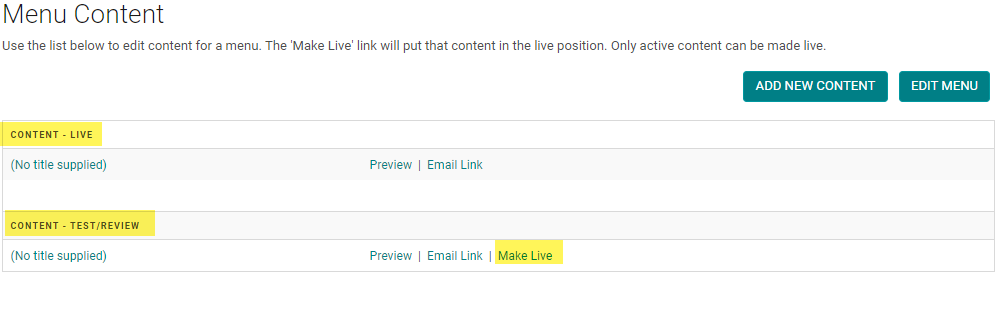
Test/Review Content: Is content that is NOT published on the website. Allows you to create "pages in waiting" or duplicate a page and make edits without publishing your content immediately.
Live Content: Is content that is published on your website (unless the Navigation Menu is set to Status = Inactive)
How to make content Live or in Test/Review status
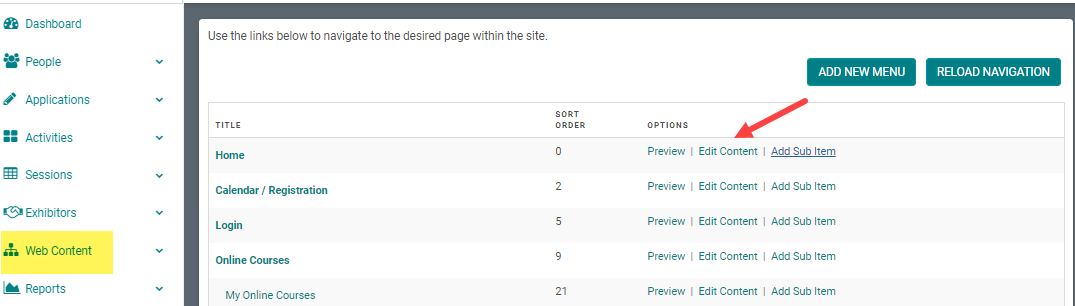
Step 1: Go to Web Content > Site Map > click 'Edit Content' next to the Menu Title you want to add content to
-OR-
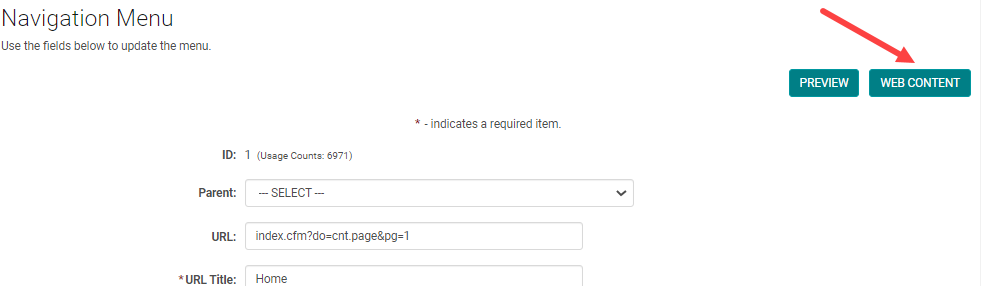
Step 1: From the 'Edit Navigation' page, click 'Edit Content'
Step 2: You will see the status of your content pages are either 'Live' or 'Test/Review.' You have the option to select the 'Make Live' link when you want to publish your Test/Review page. Once you make the Test/Review page live, the current live page will change to Test/Review.
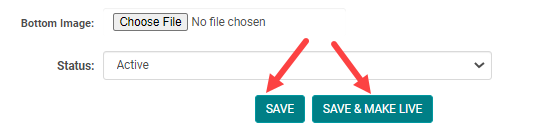
NOTE: when you click on the 'Add New Content' button, you will have the option to 'Save' or 'Save & Make Live' your content page.
Related Articles
Add New Content Page
Step 1: Go to Web Content > Site Map > click 'Edit Content' next to the Menu Title you want to add content to -OR- Step 1: From the 'Edit Navigation' page, click 'Edit Content' Step 2: Click 'Add New Content' Step 3: Add the appropriate content and ...Edit Content Page
Step 1: Go to Web Content > Site Map > click 'Edit Content' next to the Menu Title you want to add content to -OR- Step 1: From the 'Edit Navigation' page, click 'Edit Content' Step 2: Select the existing Content Title you want to edit, or click 'Add ...August 2021 Release Notes
The below product updates are scheduled to go live August 23, 2021. Release notes for each update will be added here once it is available in your test environment. Time Zone Support: Ability to set a time zone for each of your conferences and have it ...Enduring Materials Post-Test Front end View
The user will be able to access the Enduring Materials either through 'Online Courses' link or 'Enduring Materials' link. This depends on the site setup. Step 1: The user will click on the 'Register' (if Registration on is flagged 'Yes') or 'Enroll' ...Enduring Materials Post-Test Front end View
The user will be able to access the Enduring Materials either through 'Online Courses' link or 'Enduring Materials' link. This depends on the site setup. Step 1: The user will click on the 'Register' (if Registration on is flagged 'Yes') or 'Enroll' ...