Register a Person From the Admin
On the Admin dashboard menu:
Go to Activities - Search and select the Activity you are registering the person for.
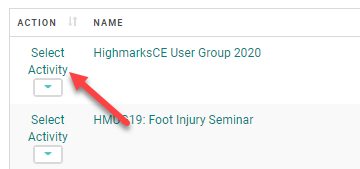
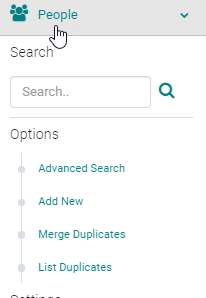
Go to People - Search for the person you want to register.
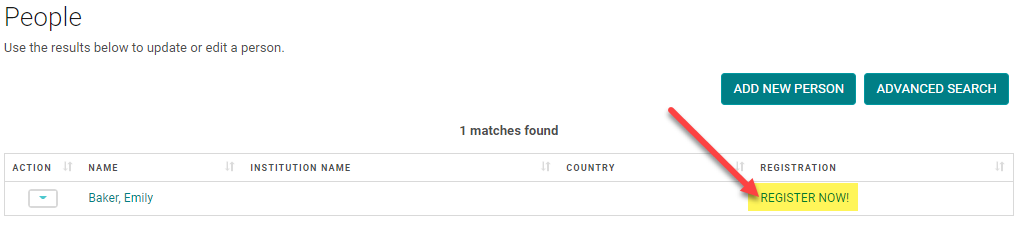
Click on the 'REGISTER NOW!' link and follow the steps to register.
NOTE: if you have partial payment for the registration, select the 'Pay Later' and follow the steps to add a partial payment to an Order: https://highmarksce.helpdocs.com/registration/adding-partial-payment-to-an-order
Related Articles
Register a Person From the Admin
On the Admin dashboard menu: Go to Activities - Search and select the Activity you are registering the person for. Go to People - Search for the person you want to register. Click on the 'REGISTER NOW!' link and follow the steps to register. NOTE: if ...How an Admin Adds Products to the Existing Orders
Go to People > use the search text box or 'Advanced Search' to find the person you need to cancel Click on the name of the person Click on the 'My Orders' button If the value of the new product is same the old product proceed to the below steps; ...Coordinator Role and Admin rights
As a part of the Activity and Speaker Management, HighMarks system allows Activity Coordinators to share a few of the Admin rights. Client Admin decides on what rights to be granted to their Activity Coordinators. Please review the below ...Add External Credit / Certificate to a Person
To add External Credits from the Admin, go to People > use the text search box or 'Advanced Search' to find the person you wish to add External Credits for From the 'Action' column, click on 'My Credits' next to the appropriate Name Click on the 'My ...Maximum Credit Person Person
Maximum Credit Per Person - This field is available on the Activity Information page. This setting is used to control the number of credits that an attendee is claimed. Example: The Activity is approved for a total of 5 credit hours. This Activity ...