Add External Credit / Certificate to a Person
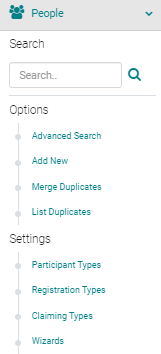
To add External Credits from the Admin, go to People > use the text search box or 'Advanced Search' to find the person you wish to add External Credits for
From the 'Action' column, click on 'My Credits' next to the appropriate Name

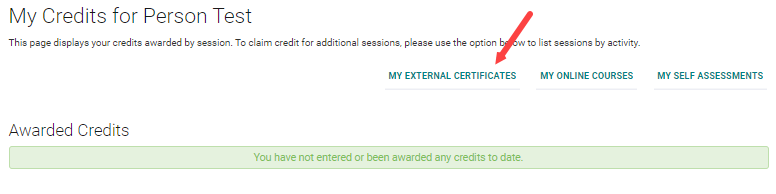
Click on the 'My External Credits' button
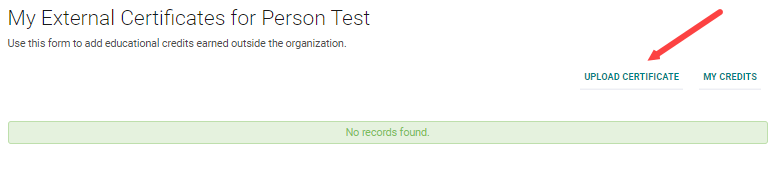
Click on the 'Upload Certificate' button
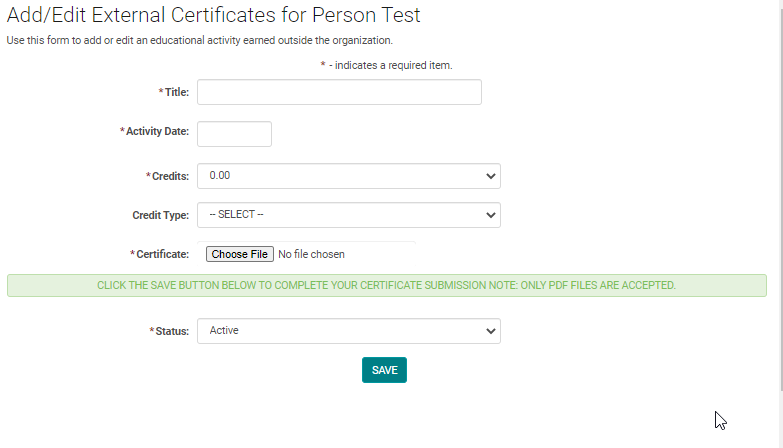
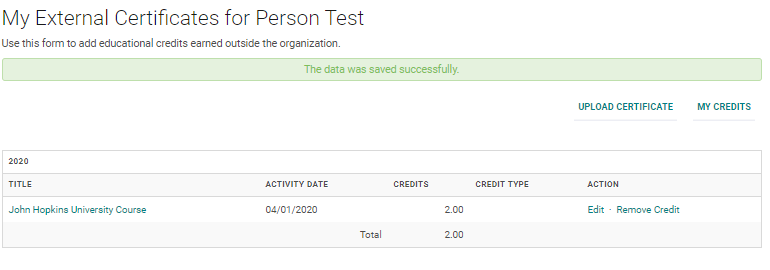
Complete the required fields and click 'Choose File' to upload the corresponding Certificate. Click 'Save' to update your changes.
You will have the option to Edit or Remove the credit
Related Articles
Maximum Credit Person Person
Maximum Credit Per Person - This field is available on the Activity Information page. This setting is used to control the number of credits that an attendee is claimed. Example: The Activity is approved for a total of 5 credit hours. This Activity ...Add a New Person
Go to People > Add New Complete the required fields, any additional information, and click 'Save' NOTE: You do not need to enter a 'Username' or 'Password', the system will automatically create one when you click 'Save' Type = Role of the Person. Eg. ...Allowing Claiming Type add a Partial Credit
This setting only works if the end user is allowed to self-claim credits for Events/Sessions. The user will have the option to adjust their credit by .25 hour/credit intervals (up to the full amount allowed for the Event/Session) if they did not ...Allowing Claiming Type add a Partial Credit
This setting only works if the end user is allowed to self-claim credits for Events/Sessions. The user will have the option to adjust their credit by .25 hour/credit intervals (up to the full amount allowed for the Event/Session) if they did not ...Add New Session/Event
Note: Prior to adding a Session you need to add the Activity. Select the Activity you want to add a new Session/Event to using the Activity Switcher Go to Sessions (or Events) and click 'Add New' Field Definitions: Type = Select the type of the ...