Issue Partial Credit from Admin
To issue partial credit for an end user within a particular Event/Session when credits are self-claimed: go to People > use the text search option or 'Advanced Search' to find the person who should receive partial credit
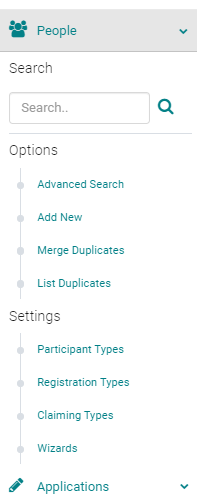
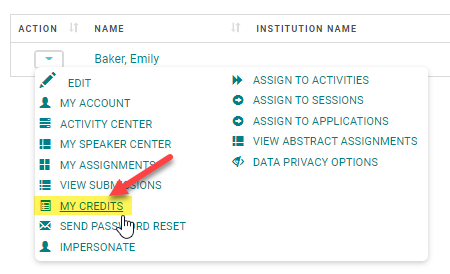
From the 'Action' column, click on 'My Credits' next to the appropriate Name
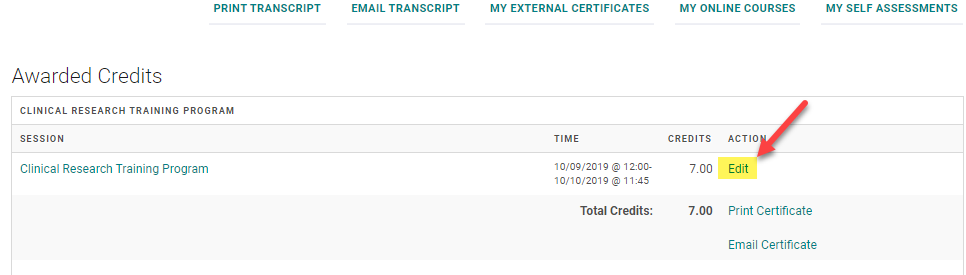
Click 'Edit' next to the Event/Session where the user should receive partial credit
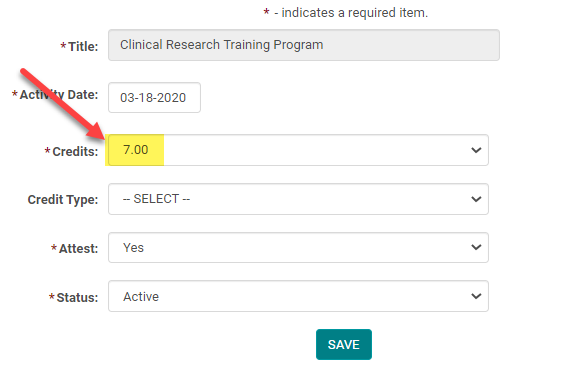
Select the appropriate amount of credit from the drop-down list (you may only award up to the total amount allowed for the Event/Session). Click 'Save' to update your changes.
Related Articles
Allowing Claiming Type add a Partial Credit
This setting only works if the end user is allowed to self-claim credits for Events/Sessions. The user will have the option to adjust their credit by .25 hour/credit intervals (up to the full amount allowed for the Event/Session) if they did not ...Allowing Claiming Type add a Partial Credit
This setting only works if the end user is allowed to self-claim credits for Events/Sessions. The user will have the option to adjust their credit by .25 hour/credit intervals (up to the full amount allowed for the Event/Session) if they did not ...Coordinator Role and Admin rights
As a part of the Activity and Speaker Management, HighMarks system allows Activity Coordinators to share a few of the Admin rights. Client Admin decides on what rights to be granted to their Activity Coordinators. Please review the below ...CPE Monitor Report and Setup
The CPE Monitor Report is used to report credit activity for pharmacists and pharmacy technicians. It contains the required information in the format specified by the Accreditation Council for Pharmacy Education (ACPE)." ACPE providers generate this ...Maximum Credit Person Person
Maximum Credit Per Person - This field is available on the Activity Information page. This setting is used to control the number of credits that an attendee is claimed. Example: The Activity is approved for a total of 5 credit hours. This Activity ...