List Duplicates
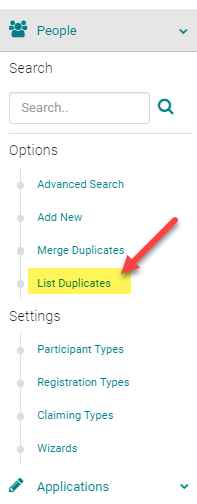
From the Admin, expand the 'People' menu and click 'List Duplicates'
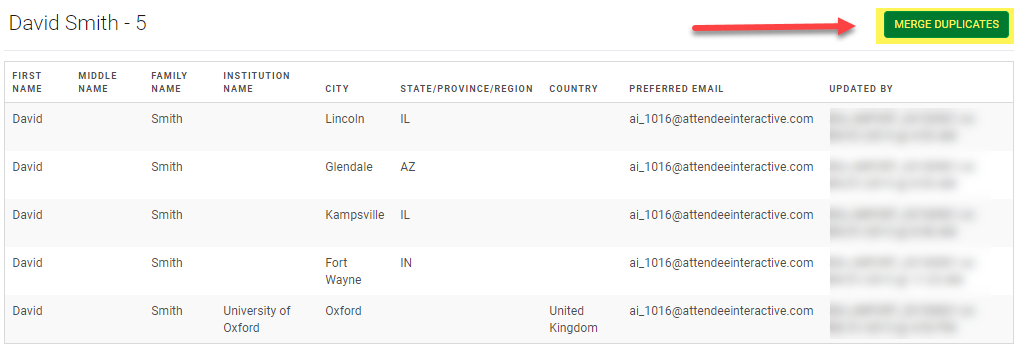
The system will search all people for a match of First Name, Last Name, and/or Email. Click "Merge Duplicates" next to the records you wish to merge
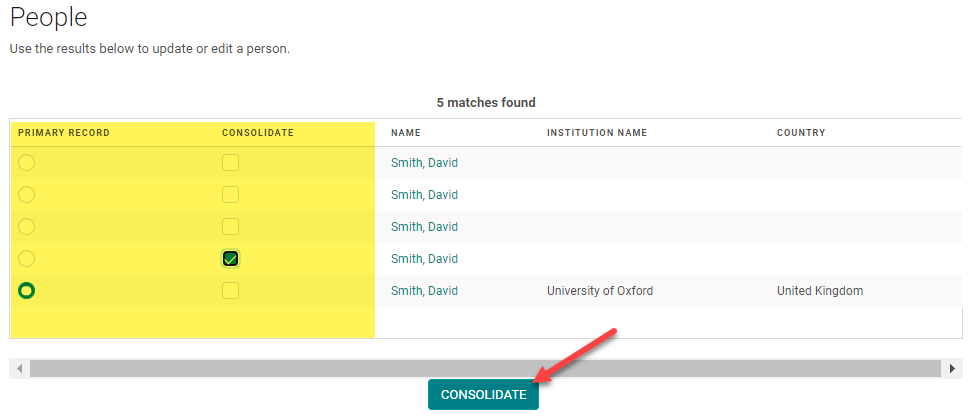
You will see two options: “Primary Record” and “Consolidate”
- Consolidate: these are all the records that will be consolidated into the primary record. All scheduled activities and credits earned will transfer to the primary record. All contact information will be deleted.
- Primary Record: all scheduled activities and contact information will be kept. This is the record that the contact will log-in with. The account with the most complete and updated contact information should be made as the primary record.
To complete the process, click Consolidate.
Related Articles
Merge Duplicates
Before you merge the duplicate profiles, read the below rules that are immediately effective upon the merge action: Profile data: Primary account is kept, and consolidated accounts are discarded. None of the data from the consolidated profiles is ...Coordinator Role and Admin rights
As a part of the Activity and Speaker Management, HighMarks system allows Activity Coordinators to share a few of the Admin rights. Client Admin decides on what rights to be granted to their Activity Coordinators. Please review the below ...Browser Settings - Enable TLS 1.1 and/or TLS 1.2 Protocols
Instructions To enable TLS 1.1 and/or TLS 1.2 protocols on web browsers, see the list below. Microsoft Internet Explorer Google Chrome Mozilla FirefoxOctober 2023 Release Notes
The below product updates are scheduled to go live October 2, 2023. Release notes for each update will be added here once it is available in your test environment. Sorting on Forms List: Added the ability to sort the list of forms in the admin under ...How to Get Roster/Attendance and Credits Reports and Send Mass Email
Reports available for sending a Mass Email are indicated with an email icon. To get list of registrants for EM - Go to Reports>People> Person Reports> Session Roster To get list of people received Credits - Go to Reports> People>Credit Reports> ...