Browser Settings - Enable TLS 1.1 and/or TLS 1.2 Protocols
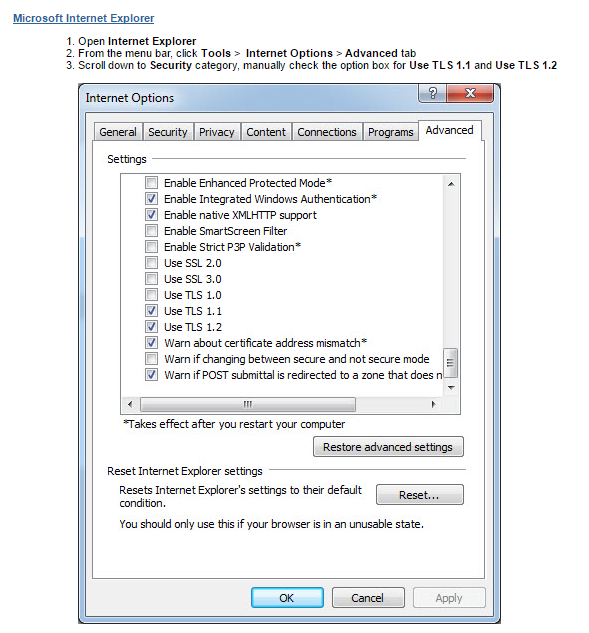
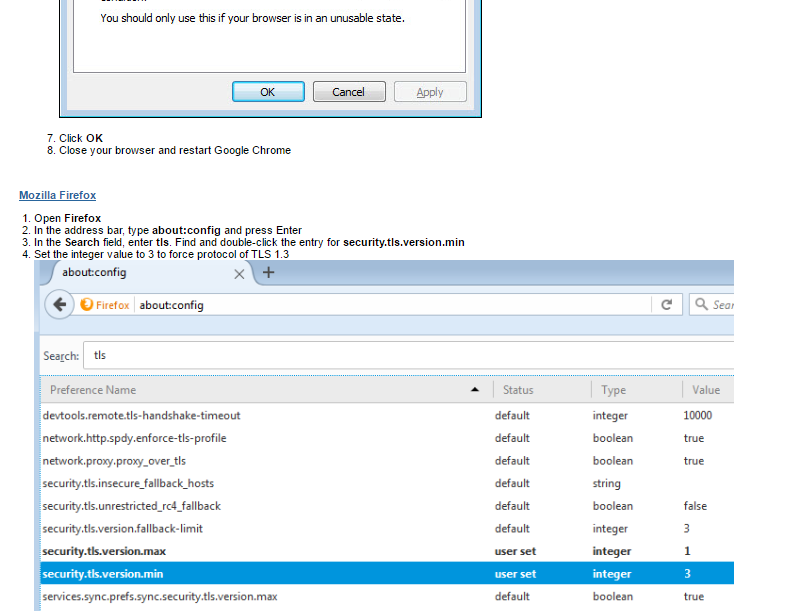
Instructions To enable TLS 1.1 and/or TLS 1.2 protocols on web browsers, see the list below.


Related Articles
Enable the Users to Cancel their Registration
This functionality is turned on per client request. Please send your request to your Project manager. Enable the User to Cancel their Own Registration Follow the steps below to enable a user to cancel their own registration without needing to contact ...Edit Form Settings
To edit Form Settings, go to Settings > Forms Click on the Form Name (or click 'Add New Form' to build a Form from scratch) Click on 'Edit Form' Edit Form Definitions Form Type There are all kinds of different forms with different uses! The Most ...Edit Form Settings
To edit Form Settings, go to Settings > Forms Click on the Form Name (or click 'Add New Form' to build a Form from scratch) Click on 'Edit Form' Edit Form Definitions Form Type There are all kinds of different forms with different uses! The Most ...CME settings for Activities are based on the 'Activity Type'
CME settings for Activities are based on the 'Activity Type' 'Registration on' and 'Claim Credit Open Access' fields are located in the Activity > Edit Activity Information ‘Product – Claim Credit Flag’ field is located in the Activity > Manage ...Send an Email to an Individual Person
This feature allows you to send an email to an individual person. See related articles for sending mass emails from reports. Go to People > use the search box or click on 'Advanced Search' to find the person you want to send an email to From the ...