How to Setup Credit Claiming deadlines for RSS /Grand Rounds
To close credit claiming for Regularly Scheduled Series (RSS) or Repeat Course after a specific number of days edit the 'Activity > Days After To Close Claiming' option.
1. Use the Activity 'Switch' or go to Activities > use the text search option or 'Advanced Search'
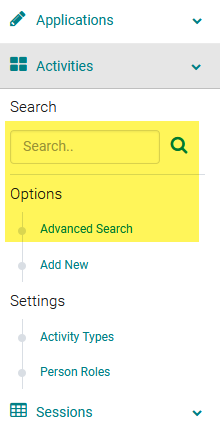
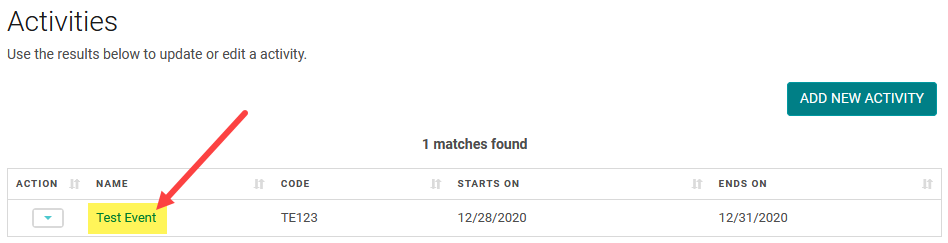
Click on the Name of the Activity
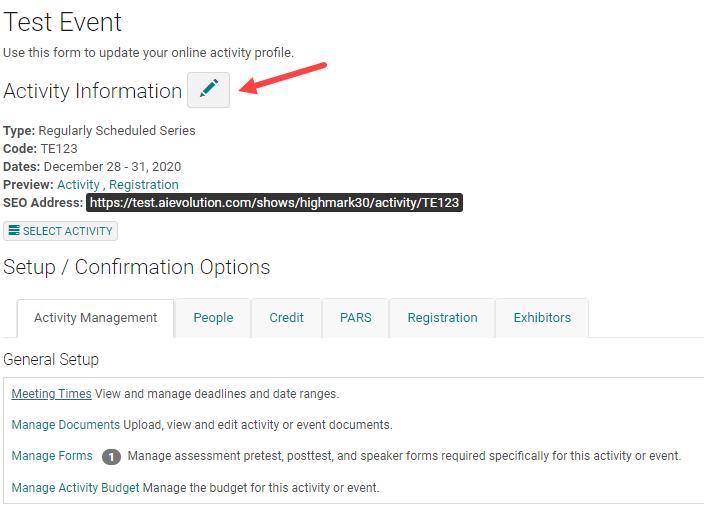
Click on the Edit icon and enter the number of days the claiming will be open after the session end date.
Update the 'Days After To Close Claiming' field.
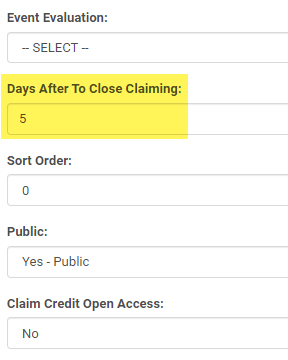
Note: First configure the main credit claiming time.
Related Articles
How to Setup Credit Claiming Deadlines for Courses
To open and close credit claiming for an Activity, add or edit the View CME /My Credits Deadline. Step 1: Use the Activity 'Switch' or go to Activities > use the text search option or 'Advanced Search' Step 2: Click on the Name of the Activity Step ...Meeting Times/Deadlines - Definitions
Deadlines controls the time period for the front end roles' ability to do certain actions and access certain sections. Activity Document Deadline: When the Coordinator has the Activity Edit rights to "Docs' section, this sets time range to upload ...How to Setup Claiming: Manage Certificates and Manage Claiming Types
Manage Certificates and Manage Accreditation: The 'Manage Certificates' and 'Manage Accreditation' feature has been enhanced to be able to add multiple certificates at once. Select the Activity and click on 'Manage Certificates'. You will see a list ...Claim Credit Tabbed Design
Please reach out to your Project Manager if you would like to update the Credit Claiming page on your site to the new tabbed design. The new version narrows down the Activity search results such that the attendees could easily identify between the ...Claiming Permissions/Product Set up
Claiming Permissions are useful when you want to restrict claiming to specific sessions. Claiming permissions are entered on the product page. You can add as many Registration products as you want and set different claiming permissions on each ...