GDPR - Data Portability - How to Export Data from the Admin side
Data Subjects are allowed to retrieve a copy of their personal data as part of the GDPR Right to Access/Right to Portability. Follow the below mentioned process to export the data to data subject when requested.
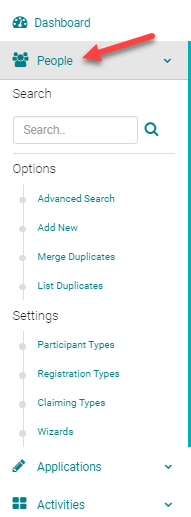
To export a person's data click on People tab and search for the person's profile under the search field.
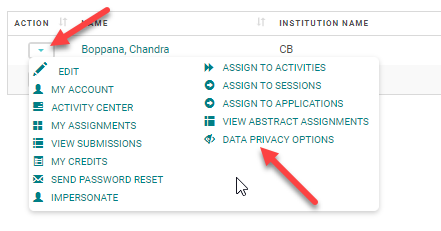
Click on the Action icon and click on Data Privacy Options
Click on Export Data(Data subject's name) button

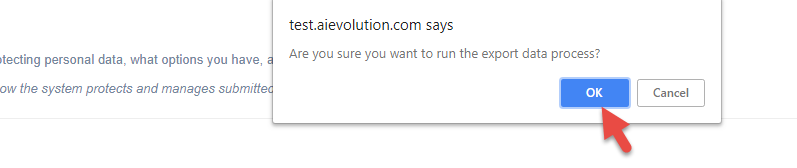
Confirm the data export process by selecting 'OK'
This message confirms that the person's data file has been emailed to the concerned data subject. Export Data generates a password protected zip file containing a person's data. Data is exported in a CSV file format and contains a read me document, which explains what each exported file contains.

This is how the email for the data subject looks, and the person can download the file and open it with the password provided in a separate email.

Look for a separate email for the password
Related Articles
GDPR - Data Portability - How the Person can Export Data from the Front End
Data Subjects can retrieve a copy of their profile data from the front end side of the HighMarks System as part of the GDPR Right to Access/Right to Portability. To get the data... Log in to the account and on the My Account page click on the link as ...GDPR - Right to be Forgotten - Remove Person's Data along with Export Data
GDPR's Right to be Forgotten allows Data Subjects to request their personal data to be removed or retained. The 'Remove/Redact' feature allows the admin to remove or retain data to fulfill a person's request to be forgotten. To remove a person's data ...Data Ownership Review
Ai began preparation for the EU's GDPR enforcement period many months ago. Our clients' data security is always at the forefront of Ai-Platforms design and support and GDPR is yet another step to secure your data. Ai created the 'Data Ownership ...Confirmation Data Grid Questions
The Confirmation Data Grid question has been updated to support the ability for the end user to enter a specific start and end date for each of their disclosed relationships. Previously, the start date was not collected from the end user and the end ...Confirmation Data Grid
Below is an example of a Question Type = Confirmation Data Grid Question Type Logic: Yes/No question for Disclosure. If yes, Relationships table is required. If no, Relationship table is not required. Relationship Entered/Start System will default ...