Confirmation Data Grid Questions
The Confirmation Data Grid question has been updated to support the ability for the end user to enter a specific start and end date for each of their disclosed relationships. Previously, the start date was not collected from the end user and the end date was autofilled. This update allows greater accuracy in capturing when financial relationships began and ended. Below details how the updated version works compared to the prior functionality.
Updated Confirmation Data Grid (as of April 2022)
When editing or adding a new question to a form, the “Question” screen will have a field called “Collect Starts On Date?” IF the question type is Confirmation Data Grid. By default, this will not be checked.
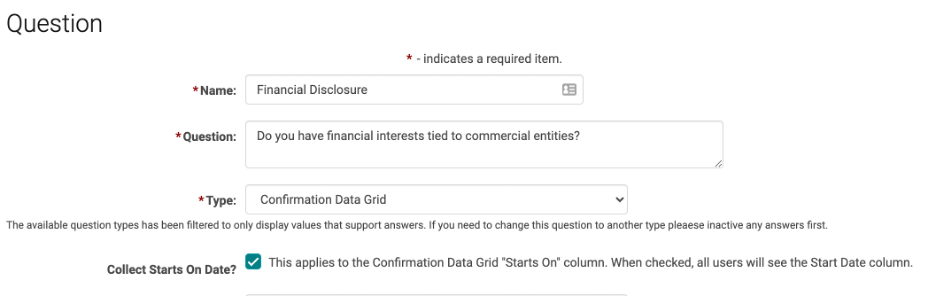
If checked, a Starts On column will appear in the grid for both the end user and the admin views and will be required.
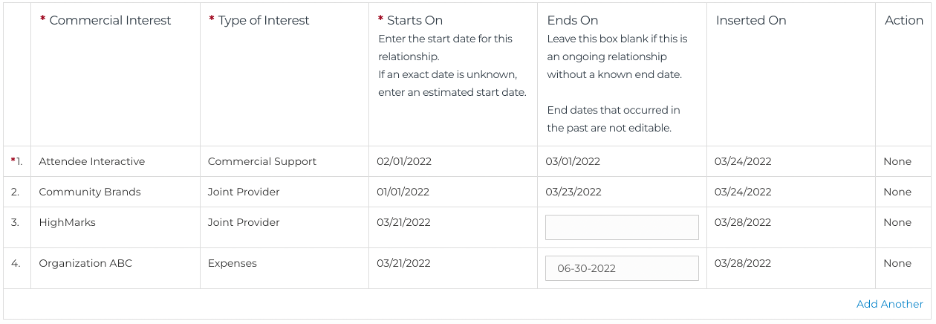
The Ends On field will allow the user to enter a specific date OR leave blank if there is no known end date. Ends On dates that are in the future or left blank can be edited later on.
If “Collect Starts On Date?” is NOT checked, the Starts On column will be hidden from the end user and admin views and the user will only enter the Ends On field as described above.
NOTE: the system is required to log a start date regardless of whether the Starts On field is visible or not. In this case, the system will record the date the user enters the relationship as the start date. This will only be visible in reports.
Reports will reflect the user entered start date if that field is turned on.
Historical Confirmation Data Grid (prior to April 2022)
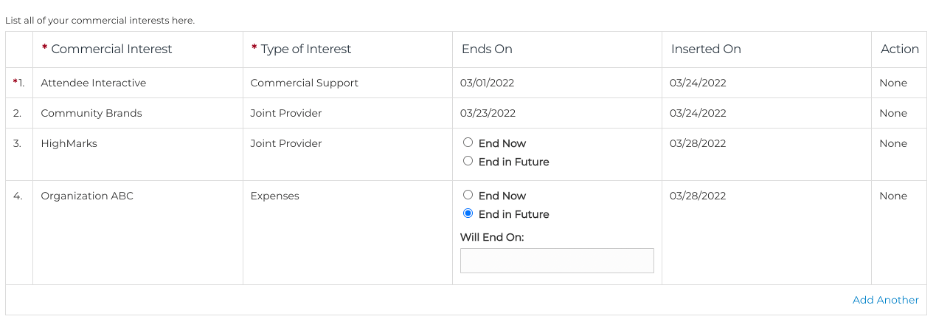
Prior to the April 2022 release, the confirmation data grid only had an “Ends On” date field where the user would select “Ends Now” when they were ready to record the relationship as ended. The system would then auto-fill the current date. Selecting “Ends In Future” enabled the user to enter a date in the future that they anticipated the relationship to end by. They will still be able to enter future dates but the updated functionality provides greater flexibility and accuracy.
Related Articles
Confirmation Data Grid
Below is an example of a Question Type = Confirmation Data Grid Question Type Logic: Yes/No question for Disclosure. If yes, Relationships table is required. If no, Relationship table is not required. Relationship Entered/Start System will default ...Reporting on the Confirmation Data Grid
Reporting on the Confirmation Data Grid Reports > Forms > Primary Form Reports > Responses STEP 1 - Filter Options Form Name = Required Completed (optional) Blank = NULL Yes = Form is complete as of 'Last Confirmed On Date' AND within the 'Age ...Data Ownership Review
Ai began preparation for the EU's GDPR enforcement period many months ago. Our clients' data security is always at the forefront of Ai-Platforms design and support and GDPR is yet another step to secure your data. Ai created the 'Data Ownership ...Form Question Types
Question Types 1) Choose One - Allow users to choose only one of the given options 2) Choose Many - Allow users to choose as many as needed 3) Free Form - Allow users to type a descriptive answer 4) Ranking - Allow users to rank the given answer ...Form Question Types
Question Types 1) Choose One - Allow users to choose only one of the given options 2) Choose Many - Allow users to choose as many as needed 3) Free Form - Allow users to type a descriptive answer 4) Ranking - Allow users to rank the given answer ...